
Connect your social profiles to your website — for search engines
A search engine that finds your website, your Facebook page and your LinkedIn page sees three strangers with a similar name. Tell it they belong together and it sees one community, three doors — which is what it needs before it will show your name, your logo and your profiles as a unit. On your site, that link is made in one place you probably already filled in for visitors: the footer.
Add the links
- Open the website editor.
- In the left icon rail, click Nav & footer, then switch to the Footer sub-tab.
- Open the Social links section. It offers a fixed set of networks — fill in only the ones you actually use.
- Paste the address of each profile (see below), then Save and Publish.
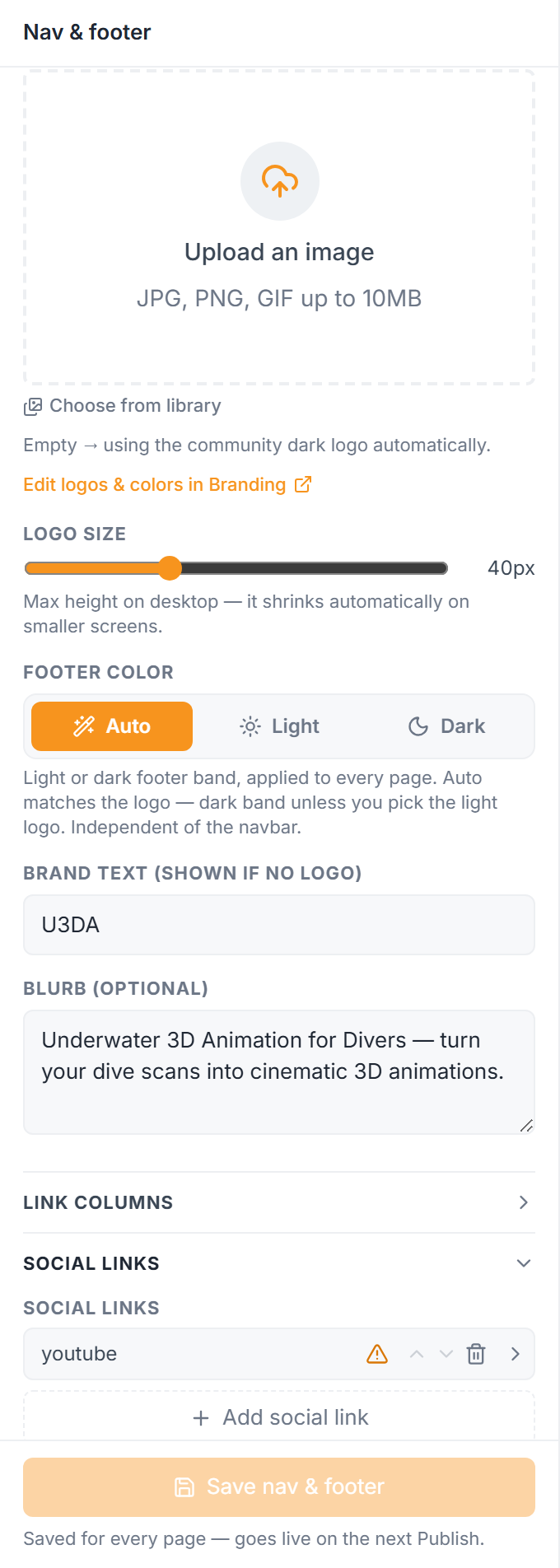
Every page of your site then carries those addresses in its structured data as `sameAs` — the standard way of saying "this organization is also the one at these addresses". You can see the result in the SEO tab: See what Google sees → the Organization node.
Profile links, not posts
The link has to be your profile or page — the address that stands for you as an organization:
| Network | Use an address like |
|---|---|
| `facebook.com/yourpage` | |
| `instagram.com/yourhandle` | |
| `linkedin.com/company/yourcommunity` | |
| YouTube | `youtube.com/@yourchannel` |
| X | `x.com/yourhandle` |
A link to a single post, reel or video is not you — it's one thing you said. The editor warns you when an address looks like a post or a video. The link still appears in the footer for visitors, but it's left out of the structured data on purpose: claiming a post is your organization would be a false statement, and search engines treat those badly.
Keep the names matching
The links only help if the profiles agree with the site. Use the same community name, the same logo and, where a profile has a "website" field, your own domain. A search engine confirms identity by looking for consistency in both directions; a LinkedIn page pointing at a different website undoes the work.
Where this shows up
Nowhere on the page — the change is entirely for machines. Over time it's what lets Google build a knowledge panel for your community (the box with name, logo and profiles) and what lets an AI assistant answer "who is this?" with your own profiles rather than a guess. It's a small task with a long tail, which is why it's worth doing once, properly.