

Show a buy-and-hold investor the whole deal, on one page.
What the house should rent for, what it costs to own, what wears out, and what is left each month. Every assumption is yours to change.
Beta · rolling out to selected agents
The questions a landlord asks, in the order they ask them.
Each report is prepared for a named client and signed by you. It starts from the public property record and the local rental market.
The property and its market
Size, age, lot, HOA, tax and sale history from the property record, next to what similar homes sell for nearby.
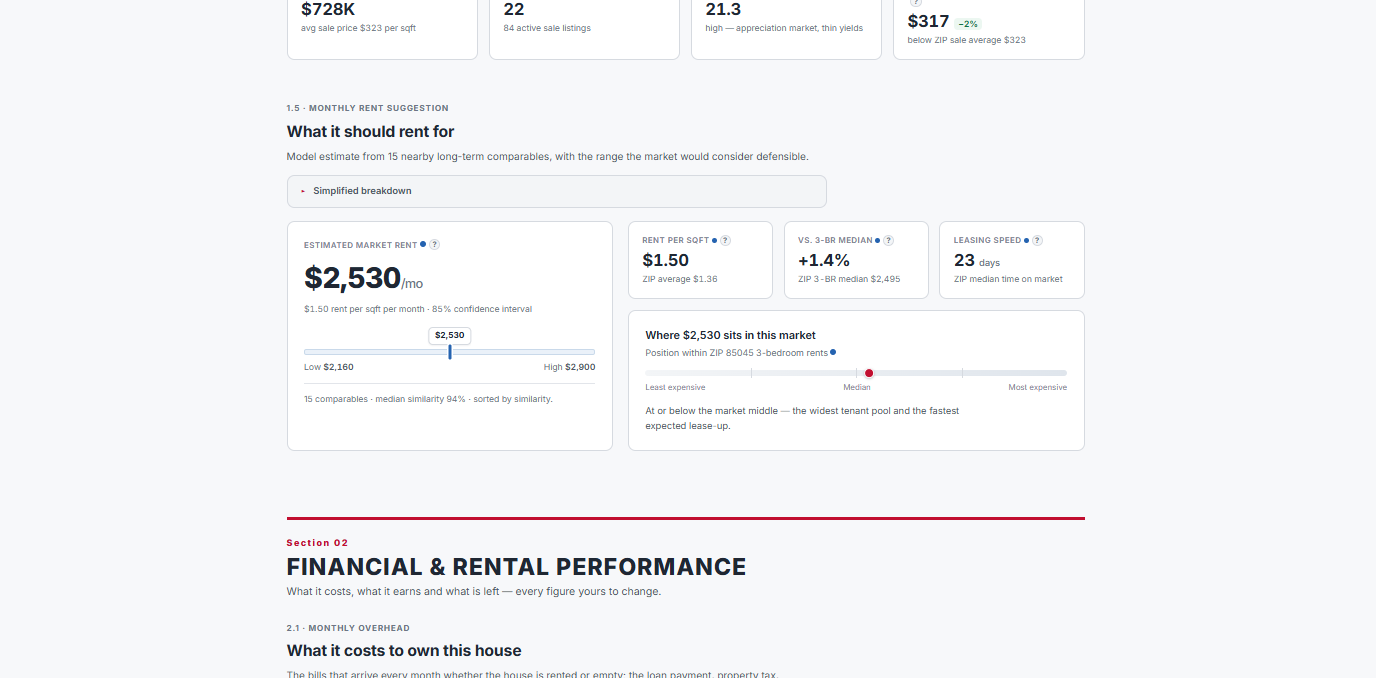
What it should rent for
A rent estimate with its low-to-high range, the nearby long-term rentals behind it, and where it sits among same-size homes in the ZIP code.
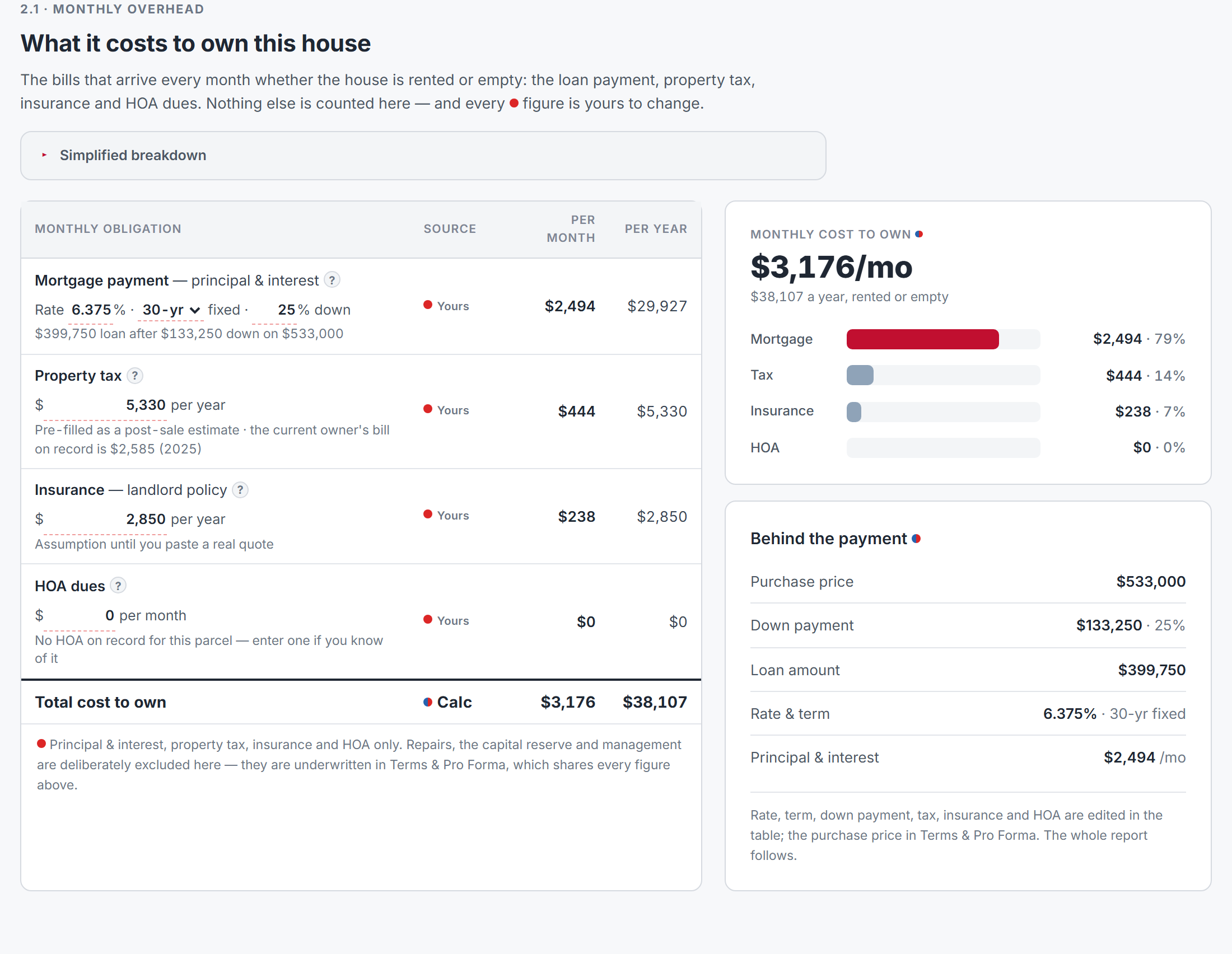
What it costs to own
Mortgage, property tax, insurance and HOA, per month and per year. Change the rate, term or down payment and the whole report follows.
What wears out, and when
Roof, heating and cooling, and other big-ticket items dated from the build year, with the monthly amount to set aside for them.
Rent growth and a ten-year hold
Rent across lease renewals, cash flow year by year, and what owning it builds over ten years.
A due-diligence checklist
Items flagged from the property itself, such as an old roof, a tax bill likely to rise after the sale, or a market where seasonal lets distort the rents.
Start with the two numbers that decide it.
The report opens its numbers with the rent and the cost to own. If one does not cover the other, your client sees it immediately.
From there, every figure marked with a red dot is editable. Change the rent, the rate or the down payment and the cash flow, the return and the ten-year view all recalculate.
A what-if panel shows the break-even rent for any down payment.
An address in, a client-ready report out.
-
1
Enter the address and your client
The report is addressed to the person you prepare it for.
-
2
The record fills itself in
Property facts, value and rent estimates, comparables and ZIP-level market data are pulled and frozen on the report date.
-
3
Set your terms
Adjust price, financing, rent, insurance and reserves to match the deal your client is actually looking at.
-
4
Share the version that fits the reader
Send the full analysis to an experienced investor, or switch to the plain-words client view for a first-time landlord.

Short-term or long-term, run both.
STR and LTR reports sit side by side in the same Reports section, so you can answer both questions for the same property.
Questions about LTR reports
Who can use it today?
Selected agents during the beta. We are widening access community by community as the report settles. Ask through the form below.
Where do the numbers come from?
The public property record, a rental comparables model, a sale comparables model and a ZIP-level market feed. Each figure shows whether it came from the data, from you, or from a calculation of both.
Can I change the assumptions?
Yes. Price, loan terms, rent, tax, insurance, HOA, maintenance, reserves and management are all editable, and the report recalculates as you type.
Does it tell my client whether to go short-term or long-term?
No. It analyses the property as a long-term rental. Run an STR report on the same address to compare the two.
Will the report change during the beta?
Yes. Layout and sections will keep improving as agents use it. Tell us what your clients ask about and it goes on the list.
Ask for a place in the beta.
Tell us where you work and the kind of rental deals your clients look at. We will show you a full report for an address in your market.



