
How agents build sites from your starters
You build the starters; your agents turn them into personal websites. Knowing exactly what they see helps you design starters that clone well and answer questions when they come up. This guide walks the agent's side of the flow from your seat.
Turning the feature on
Agents only see any of this once the Agent Websites feature is on for your community. That switch adds My Website to the member portal and lets agents clone and publish. It's a platform-operator control — if you need it on and don't see a toggle, ask your platform operator. (For how per-feature settings work in general, see Configure your community's feature settings.)
Until then, you can still build and preview starters; agents just can't reach them yet.
What an agent does
From the member portal, an agent opens My Website and works through a short flow:
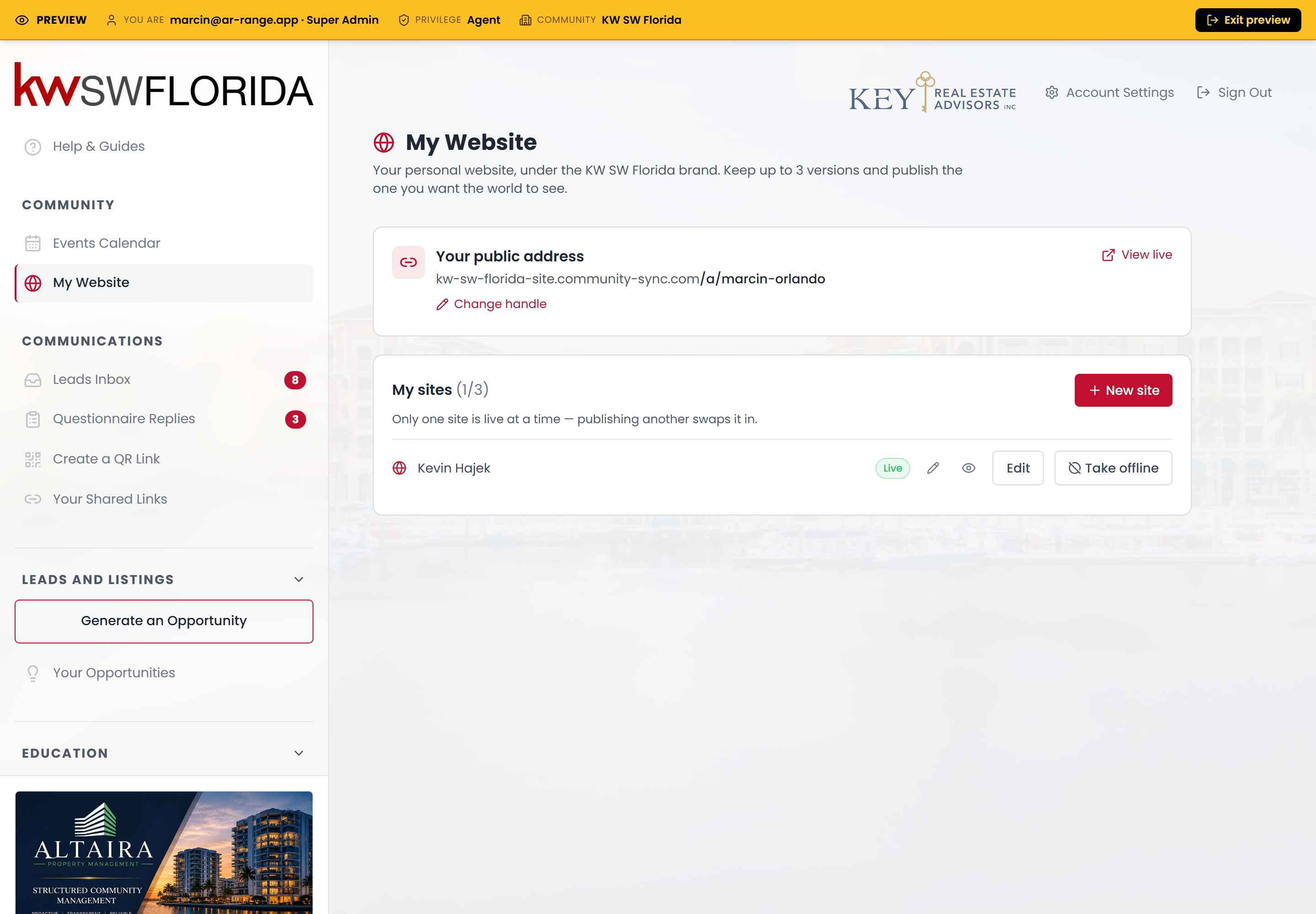
- Claim a public address. They pick a handle — say `jane-smith` — and their published site will live at `yourcommunity-site.mycommunitysync.com/a/jane-smith`. Without a handle a site can be published but isn't reachable, so this is step one.
- Create a site from a starter. Under My sites, they click New site, then Start from a template. Each of your starters shows as a card with its name, the "Who is this for?" blurb you wrote, and a Live demo link (the preview of your starter). They pick one, name their own copy, and click Create — which clones your starter into their own independent site.
- Personalize it. They open their copy in the same full-screen editor and edit the copy, photo, bio, and listings.
- Publish. Publishing makes that site their public website. They can keep up to three versions but only one is live at a time — publishing a different one automatically takes the previous one offline. Take offline unpublishes entirely.
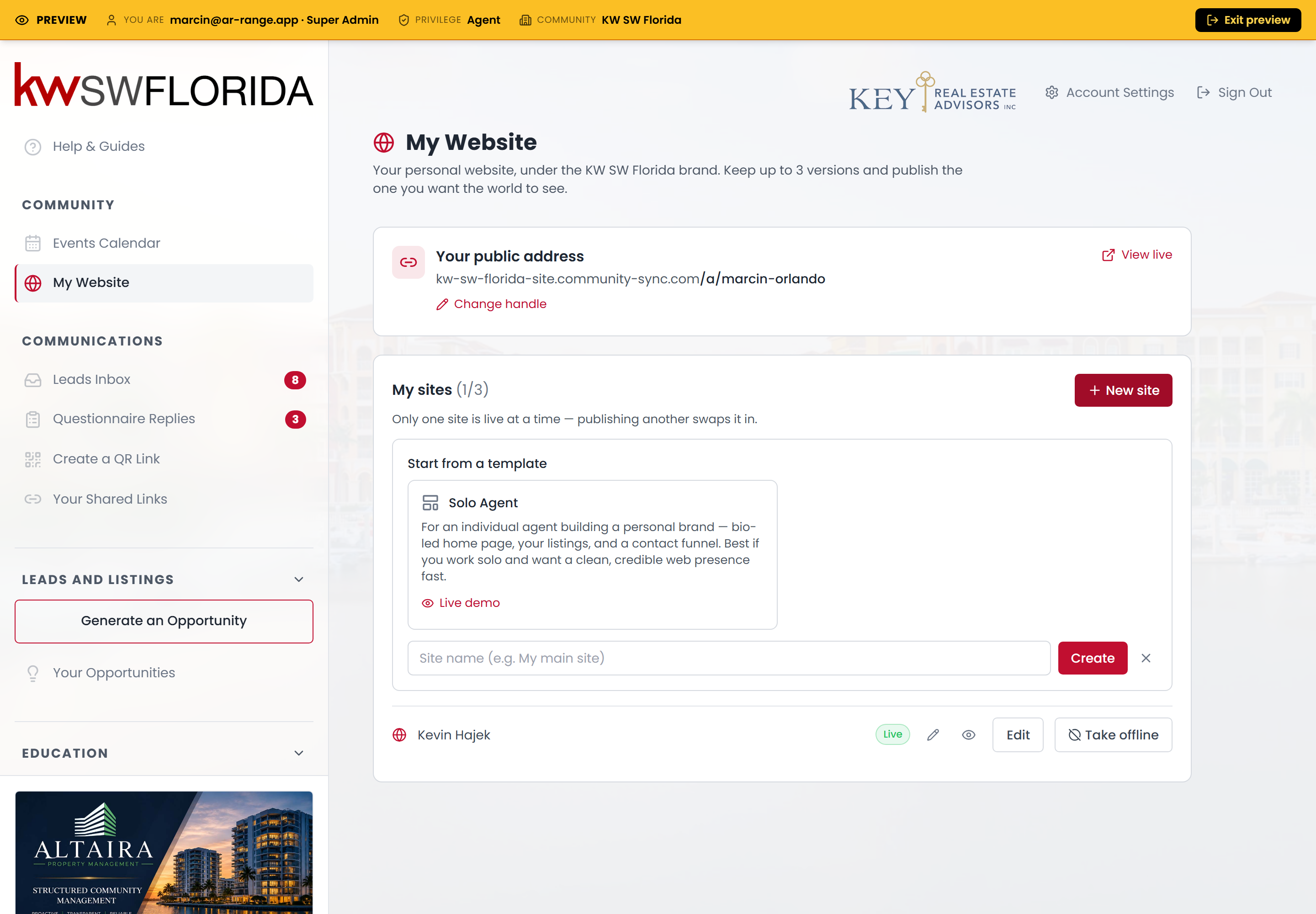
The outside world only ever sees one site at a stable address, no matter how many drafts the agent keeps behind the scenes.
What carries over from your starter
- Every page, the navigation, the footer, and the theme you saved in the starter.
- Your community's brand by default — the agent can override their own logo and photo.
- The listings block, which the agent can narrow to their own properties from their editor.
What does not carry over is any later change you make to the starter — a clone is independent from the moment it's made. See Design a great agent starter site for what to put in (and leave out of) a starter so it clones cleanly.
How you can help agents
- Give them at least one good starter before you announce the feature — an empty picker just tells them to check back.
- Write a clear "Who is this for?" blurb so agents pick the right shape. See Manage your agent starter sites.
- Point them at the member guides for the editing and publishing steps once they've cloned.
Troubleshooting
An agent doesn't see My Website at all
The Agent Websites feature isn't on for their community. It's a platform-operator setting — ask your platform operator to enable it. Confirm the agent is signed into the right community, too.
An agent's picker is empty
There are no starters to clone in their community yet. Create one — see Create a starter site for your agents.
An agent published but their site isn't reachable
They haven't claimed a handle yet. A published site with no handle has no public address. They claim one on the My Website page, and their site comes up at `.../a/their-handle`.
An agent hit a limit creating a new site
Agents can keep up to three sites. To make a new one past that, they delete one they no longer need, then clone again.